> ## Documentation Index
> Fetch the complete documentation index at: https://docs.nyru.net/llms.txt
> Use this file to discover all available pages before exploring further.
> Our Firewall Panel offers comprehensive rule configuration options to protect your services against various DDoS attacks. This documentation explains how to create and manage custom security rules.
# Firewall Rules
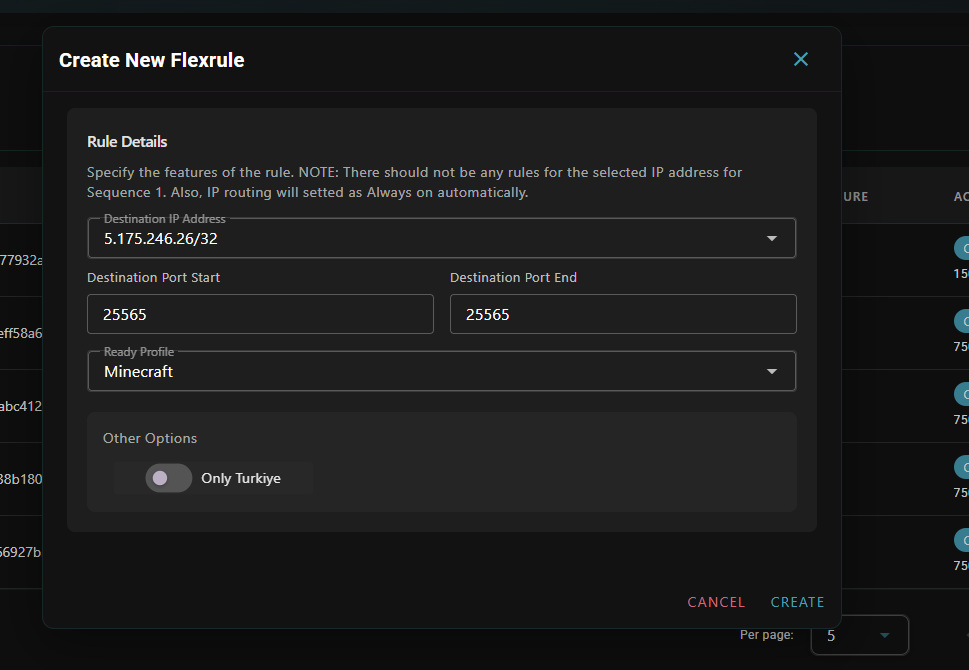
## **Ready Rules**
For quick protection setup:
* **Simple Configuration**: Just select port, application profile, and destination IP
* **Instant Activation**: Rules become active in less than 1 second
* **Common Protection**: Pre-optimized profiles for typical attack scenarios
 ## **Advanced Rules**
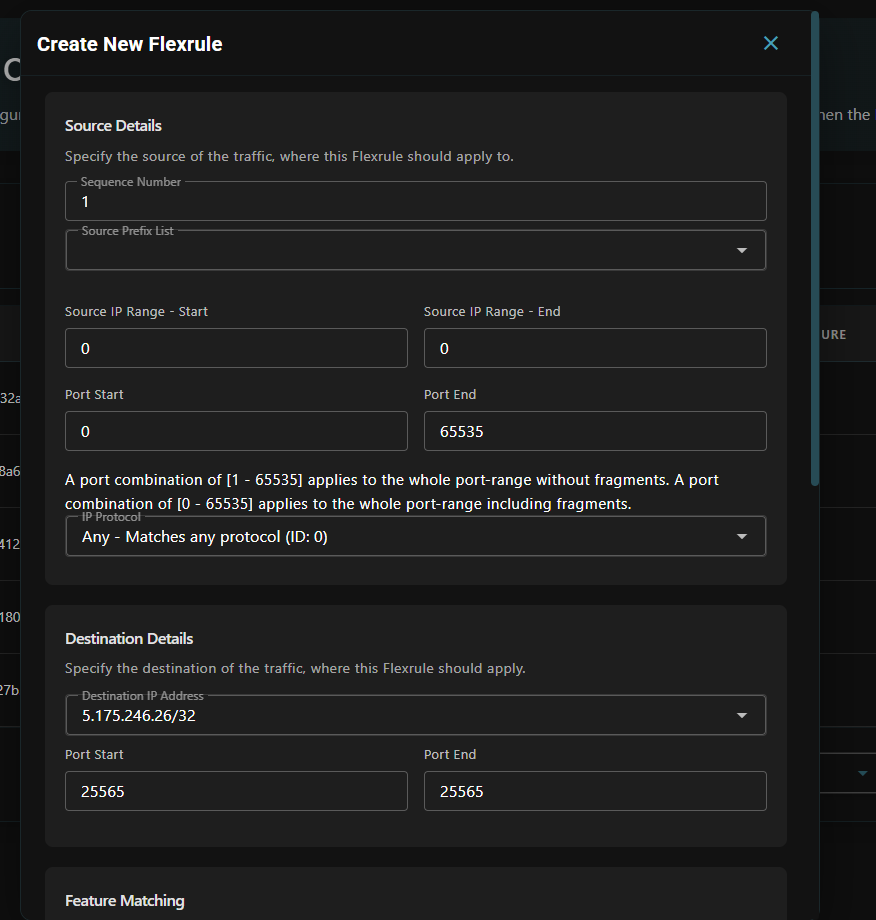
For customized security requirements:
### **Packet Filtering Options**
* **Sequence Number**: Rules are processed according to sequence numbers
* **Protocol Selection**: Choose from TCP, UDP, ICMP, or over 140 different protocols
* **Source Prefix Lists**: Define specific IP ranges
* **Destination Settings**: Target specific IP addresses and ports
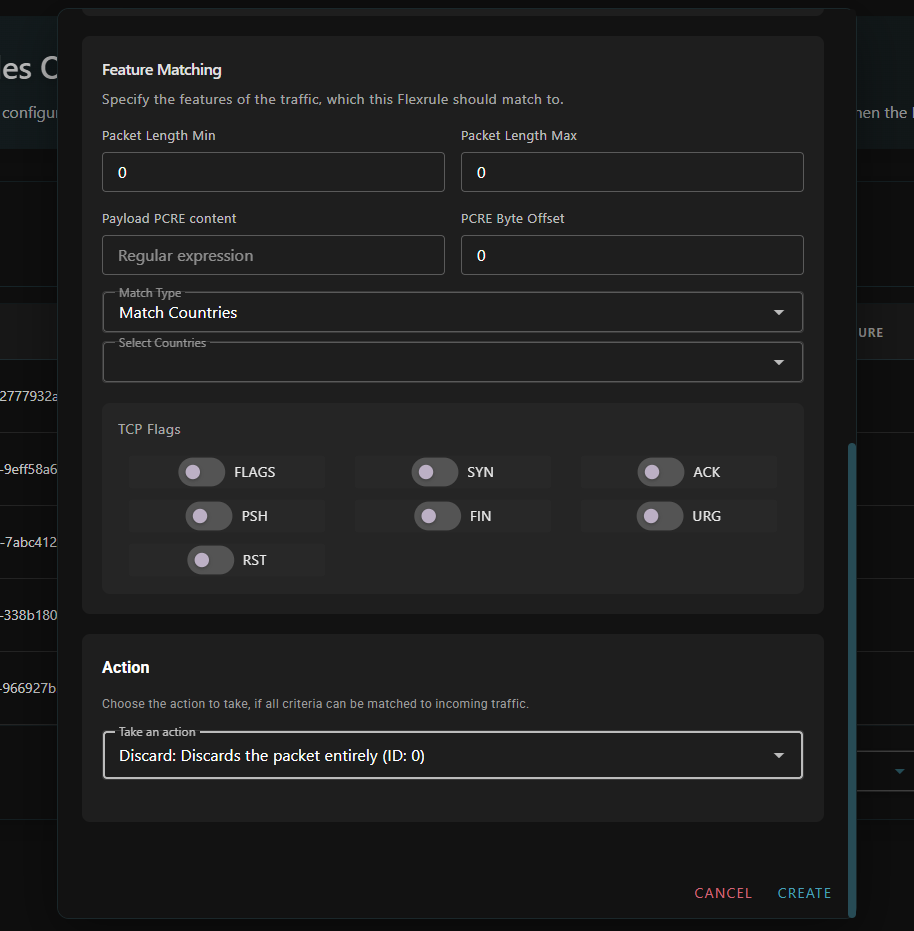
### **Deep Inspection**
* **Packet Length**: Filter packets by size
* **Payload Analysis**: Content-based filtering
* **Geographic/ASN Filtering**: Control traffic by country or AS number
* **TCP Flag Control**: Define specific TCP flag combinations
## **Advanced Rules**
For customized security requirements:
### **Packet Filtering Options**
* **Sequence Number**: Rules are processed according to sequence numbers
* **Protocol Selection**: Choose from TCP, UDP, ICMP, or over 140 different protocols
* **Source Prefix Lists**: Define specific IP ranges
* **Destination Settings**: Target specific IP addresses and ports
### **Deep Inspection**
* **Packet Length**: Filter packets by size
* **Payload Analysis**: Content-based filtering
* **Geographic/ASN Filtering**: Control traffic by country or AS number
* **TCP Flag Control**: Define specific TCP flag combinations
 ## **Available Actions**
Choose how to handle matched traffic:
* **Discard**: Block matching packets completely
* **Accept with Destination Ratelimit**: Allow traffic with limits to destination IP
* **Accept with Source Ratelimit**: Allow traffic with limits from source IP
* **Accept with Rule Limit**: Apply total traffic limit for the specific rule
* **Custom Configuration**: Define completely customized behavior
* **Set Application Profile with Source Ratelimit**: Apply application profile with source limits
## **Sequential Processing**
Firewall rules are processed according to sequence numbers:
* **Closed Chain Requirement**: Rules should form an uninterrupted sequence (e.g., 1,2,3,4,5)
* **First Rule**: Every destination IP prefix starts with sequence number one (1)
* **Processing Flow**: Open chains (e.g., 1,2,4,5) stop processing after the last matching rule
* **Rule Limit**: Maximum of ten (10) rules due to system limitations
## **Available Actions**
Choose how to handle matched traffic:
* **Discard**: Block matching packets completely
* **Accept with Destination Ratelimit**: Allow traffic with limits to destination IP
* **Accept with Source Ratelimit**: Allow traffic with limits from source IP
* **Accept with Rule Limit**: Apply total traffic limit for the specific rule
* **Custom Configuration**: Define completely customized behavior
* **Set Application Profile with Source Ratelimit**: Apply application profile with source limits
## **Sequential Processing**
Firewall rules are processed according to sequence numbers:
* **Closed Chain Requirement**: Rules should form an uninterrupted sequence (e.g., 1,2,3,4,5)
* **First Rule**: Every destination IP prefix starts with sequence number one (1)
* **Processing Flow**: Open chains (e.g., 1,2,4,5) stop processing after the last matching rule
* **Rule Limit**: Maximum of ten (10) rules due to system limitations
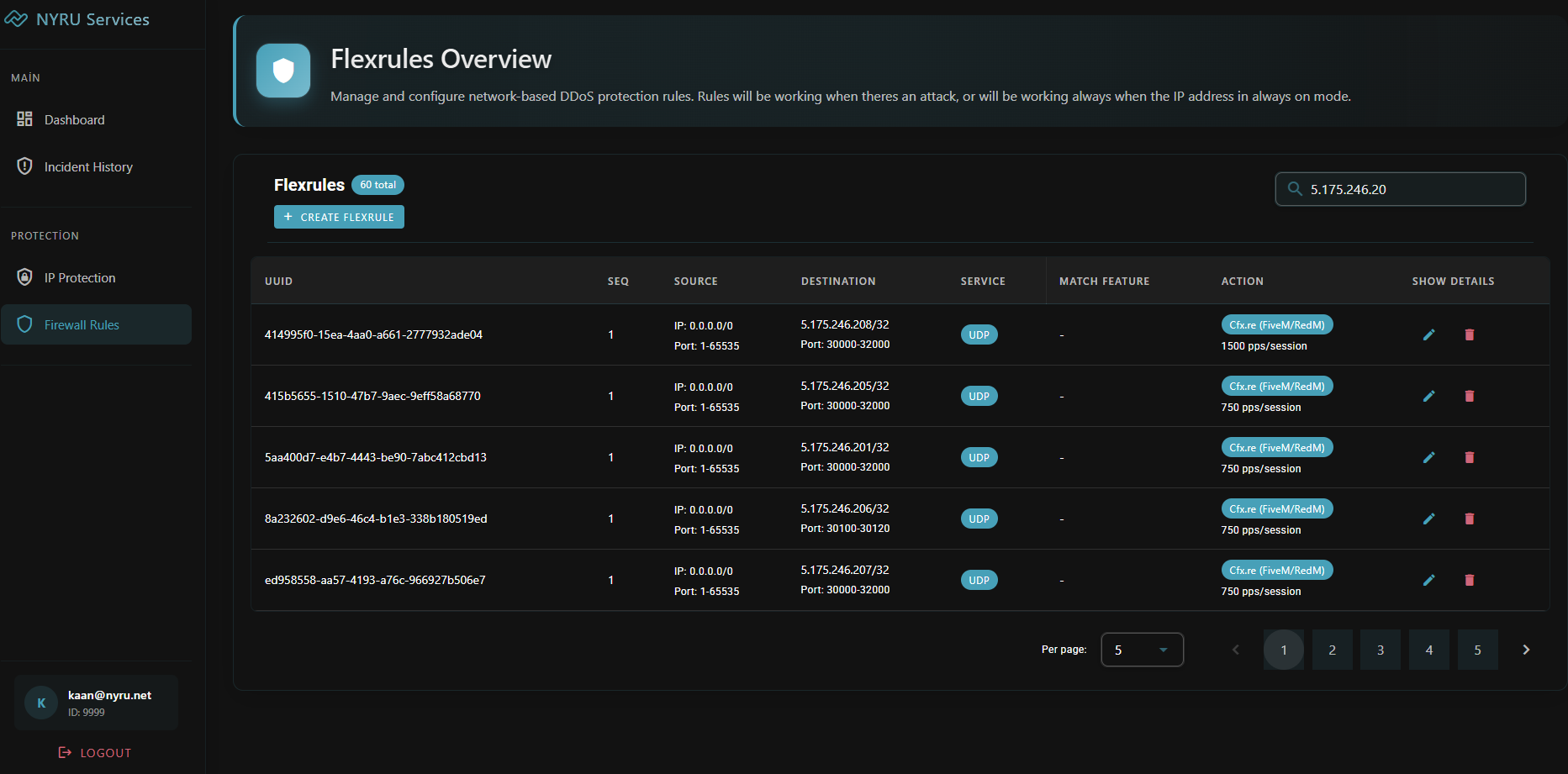 All rule changes take effect in less than 1 second, allowing quick response to DDoS attacks. You can monitor rule performance and matching statistics in real-time through the Firewall Panel.